Aurra Crystal Studio
B2B Wholesale Inventory Management & Operations Platform

Aurra Crystal Studio
B2B Wholesale Inventory Management
& Operations Platform

Desktop App | End-to-End UX Design | UI Design | Design System | UX Strategies | New Feature Development | Content Design | Problem-solving | Iconography | Prototyping
This project is a B2B wholesale inventory management and operations platform built for the people who keep things running smoothly, like admins, customer service staff, and managers.Before this platform, running a wholesale business meant relying on spreadsheets. Admins had to enter orders in one Excel file, check inventory in another, and constantly switch between files. The aim was simple: combine all these tasks into one system. Now, inventory management, order processing, customer records, payment tracking, and reporting are all in one place, connected and easy to see.
Project Goals
  • Give admins one platform to manage everything, so they can work efficently without switching between tools.
  • Build trust with wholesale buyers through transparency and smoother workflows.
  • Help admins make better decisions with the right insights, so they can plan ahead instead of reacting.
Approach
01.
Understand & Research
02.
Define
03.
Design solution
04.
Validate
MY ROLE
UX Designer | Product Designer | UX Researcher
Timeline
1 Year
Cross-functional collaboration
PM&BA | Engineering
PROBLEM STATEMENT
Wholesale admins handle a lot each day, from orders and inventory to customer contacts, invoices, and fulfillment. But all this information is scattered across different places. Without a single system, they have to juggle several tools, check details by hand, and keep track of everything in their heads. This means the team spends more time managing their tools than running the business, and mistakes often surface only after it’s too late.
DESIGN CHALLENGE
How might we create a single platform that lets wholesale admins see everything they need, make daily tasks easier, and spot mistakes early? This way, the team cann feel confident and stay ahead, rather than always trying to catch up.
DESIGN SOLUTION
We aim to design a platform that moves admins from chaos to clarity, and finally to control. Giving them one place to see everything, at without friction, and stay ahead of what's coming.
Before starting my research, I wanted to understand how admin users currently manage wholesale operations end-to-end and how to make their days more efficient.
To explore that, I framed my research around 4 key questions:
Competitor analysis
I'm conducting a competitor analysis to identify which design patterns and features are commonly used across B2B wholesale platforms, understand the gaps and frustrations admins face today, and find clear opportunities to design an admin portal that is more unified, intuitive, and admin-friendly.
I’m analyzing 3 existing apps listed below. Because they share some of the same goals as our app.
Faire
B2B
Wholesale Marketplace
Order Dashboard
CRM Tools
Analytics
Catalog Manager
Buyer Messaging
Shopify B2B
Unified Admin Portal
from a Single Backend
Company Accounts
Custom Pricing
Analytics
Role Permissions
Draft Orders
Cin7
Inventory & Order
Management Platform
Real-time Inventory
AI Forecasting
Multi-Warehouse
Auto-Fulfillment
700+ Integrations
PDF - RESEARCH
Click to see detailed research.
Key Takeaways
  • Faire is effective at managing buyer relationships, but its marketplace rules limit admin flexibility and control.
  • Shopify B2B supports both DTC and wholesale businesses, offering strong pricing and order management, but its inventory features are weaker, and many advanced functions require developer support.
  • Cin7 is feature-rich for warehouse and operations teams, but its complex and fragmented interface creates a steep learning curve.
All three platforms share a core issue: buyer information, order history, communication records, and inventory data are stored separately, requiring admins to manually compile a complete view. Additionally, many features need technical expertise to configure, further restricting admin control.

No current platform provides wholesale admins with the autonomy, visibility, and simplicity to manage all tasks in one place.
Interviews & Mapping
After completing the competitor analysis, I had a clearer picture of what current platforms do well and where they fall short.


However, understanding the tools was only the first step. To gain deeper insight into users’ needs, I conducted user interviews with wholesale admins to understand how they handle daily tasks, what frustrates them most, and what could make their work easier.
Interviews content
User Groups
1 on 1 Interviews
Duration: 45-60 minutes
Total Participant: N=8
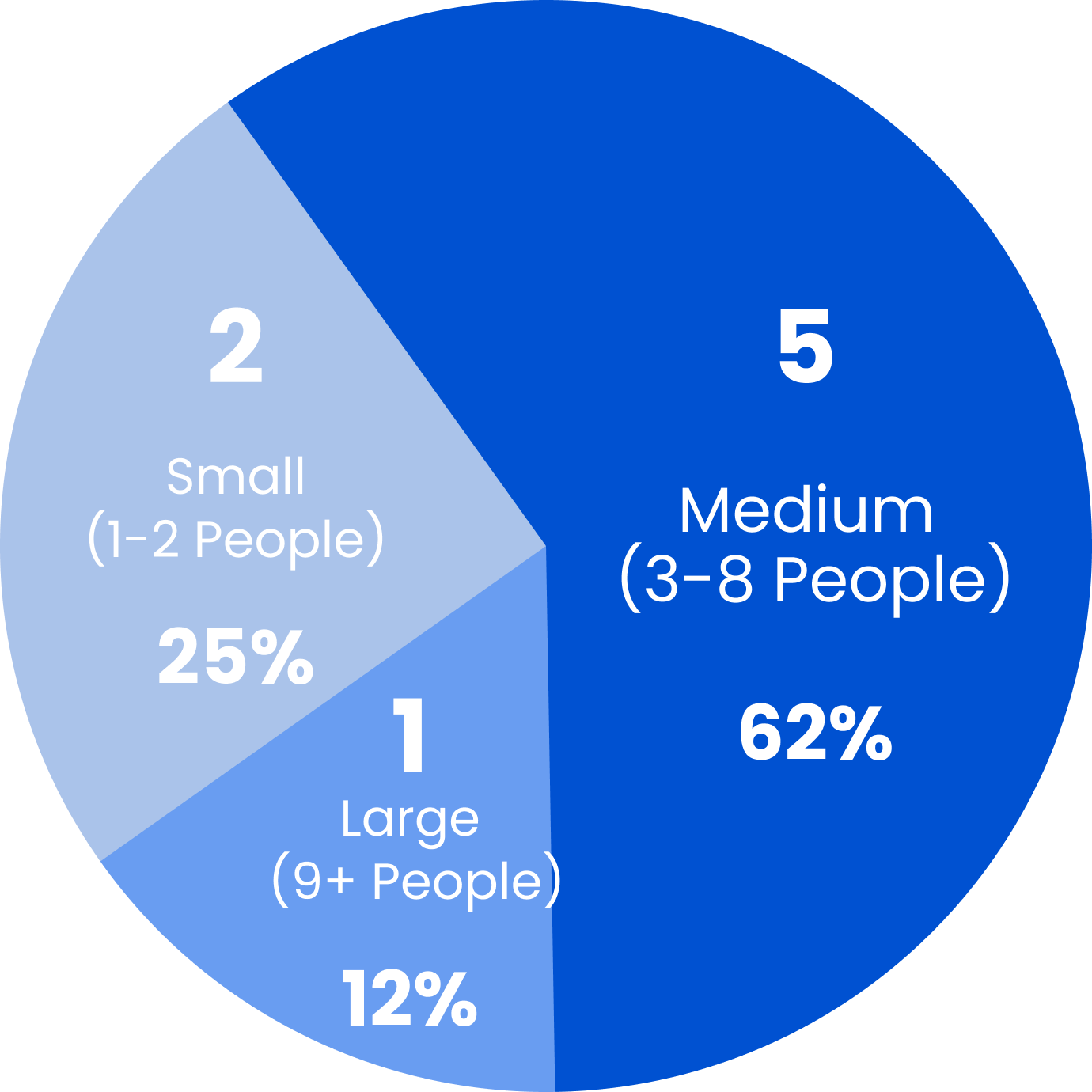
Organization Size
Total Participant: N=8
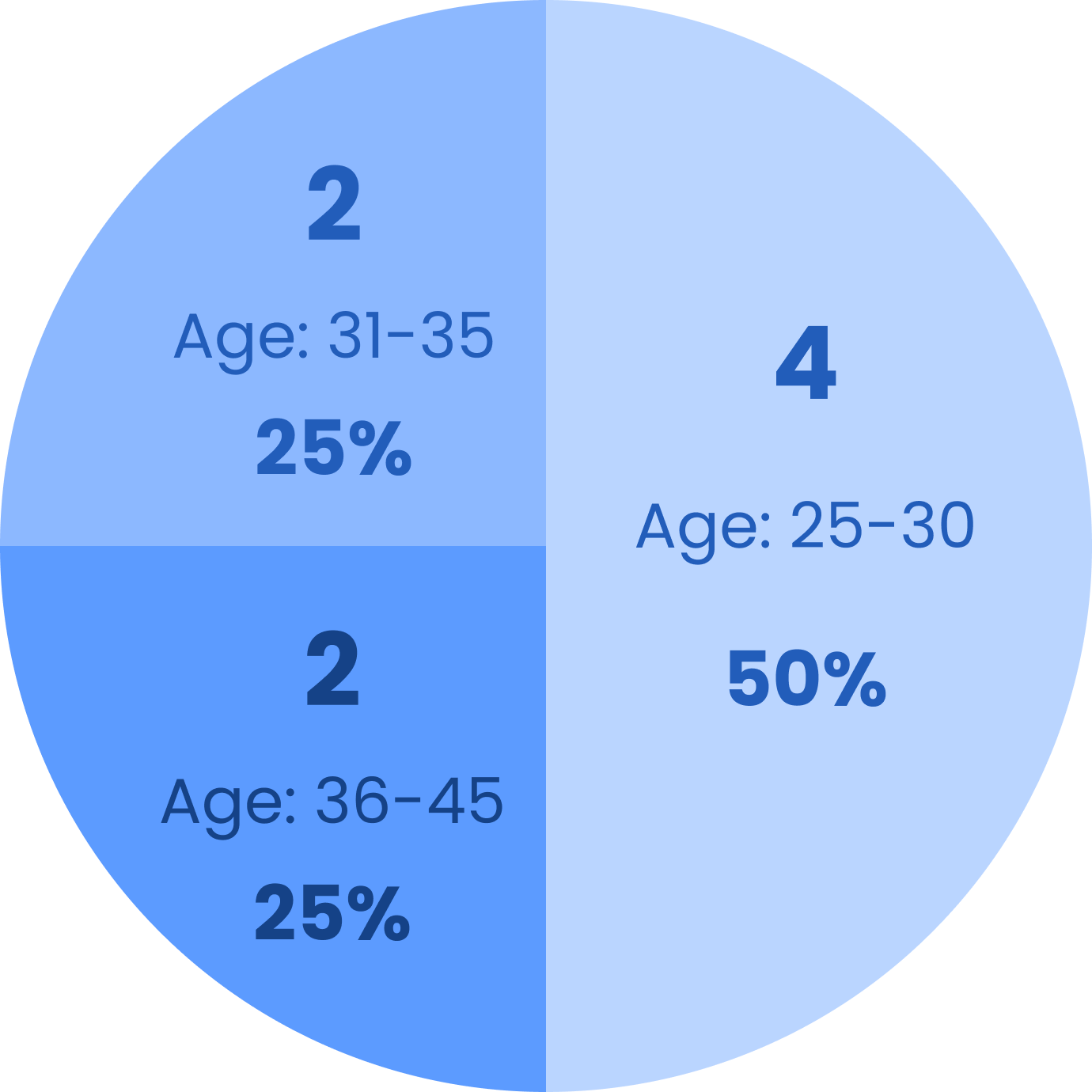
Age Distribution
Total Participant: N=8
Business Type
Social-first (IG / TikTok / WhatsApp) : 2
E-commerce (Shopify / Etsy / Faire) : 2
Multi-channel Hybrid: 1
Large-scale Ops : 1
Gender
Male: 3 37.5%
Female: 5 62.5%
Experience Level
Beginner: 1 (12.5%)
Intermediate: 5 (62.5%)
Senior: 2 (25%)
Affinity mapping
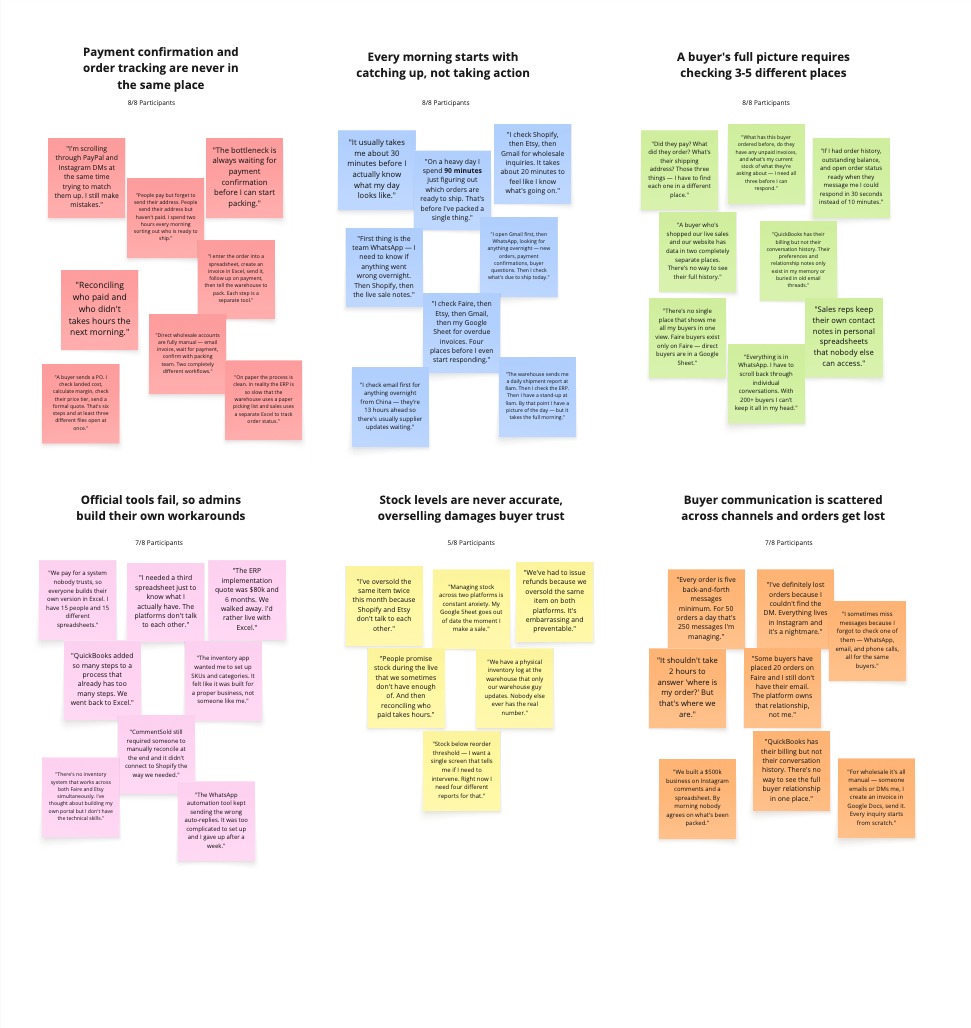
Later on, I created an affinity map to brainstorming and analysis all the findings based on our user interview responses.
Every cluster pointed to the same feeling: Users felt confusing and time-wasting
Some common areas we found:
1
Payment confirmation and order tracking
are never in the same place.
2
Every morning starts with catching up
not taking action
3
A buyer's full picture requires checking
3-5 different places
4
Official tools fail, so admins have to
build their own workarounds
5
Stock levels are never accurate,
Overselling damages buyer trust
6
Buyer communication is scattered
across channels and orders get lost
Results
After organizing all the interview datas into an affinity mapping, clear patterns emerged that directly affected our design decisions. This research process revealed not only what frustrates users, but also why apps fail at the critical moments people need them most.
Finding 1:
Payment and order information are never in the same place.
We should consolidate order details, payment status, and shipping status into a single panel. This will allow admins to view an order’s status and next steps without switching between tools.
Finding 2:
Admins currently spend 20 to 90 minutes each morning determining overnight activity.
We need a start-of-day panel that immediately highlights key issues requiring attention as soon as admins log in.
Finding 3:
Understanding a buyer requires checking multiple places.
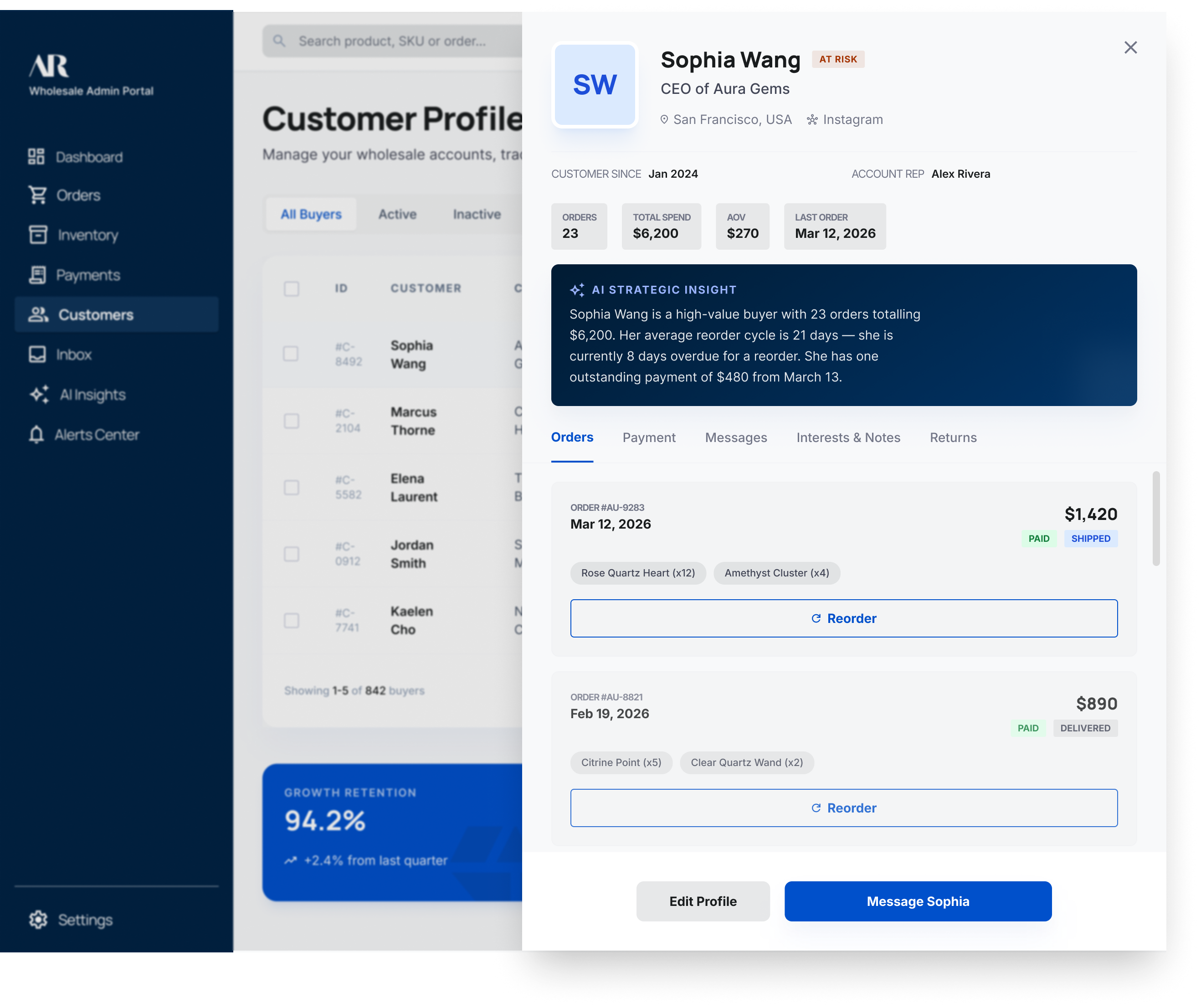
Admins can never get the full picture quickly. We need a unified buyer profile that consolidates order history, payment status, outstanding balance, communication history, and preferences in one place.
Finding 4:
Existing tools are too complex, too rigid, or too expensive.
Admins often work around these systems instead of with them. The platform should be designed to support their actual workflows, rather than requiring them to adapt.
Finding 5:
Inventory numbers are never fully up to date, which leads to overselling and broken buyer trust.
We need to automatically alert admins when stock is approaching a critical level, so they never have to check manually.
Finding 6:
Buyer communication is currently fragmented across multiple apps, causing messages and orders to be misplaced.
All communication should be linked to the relevant buyer and order to ensure admins have complete context as soon as a message arrives.
Across all 6 findings, one core problem stands out
Admins spend much of their day looking for information instead of getting things done.
We should build a platform that puts everything in one place. This way, as soon as an admin logs in, they can see what needs attention and act right away.
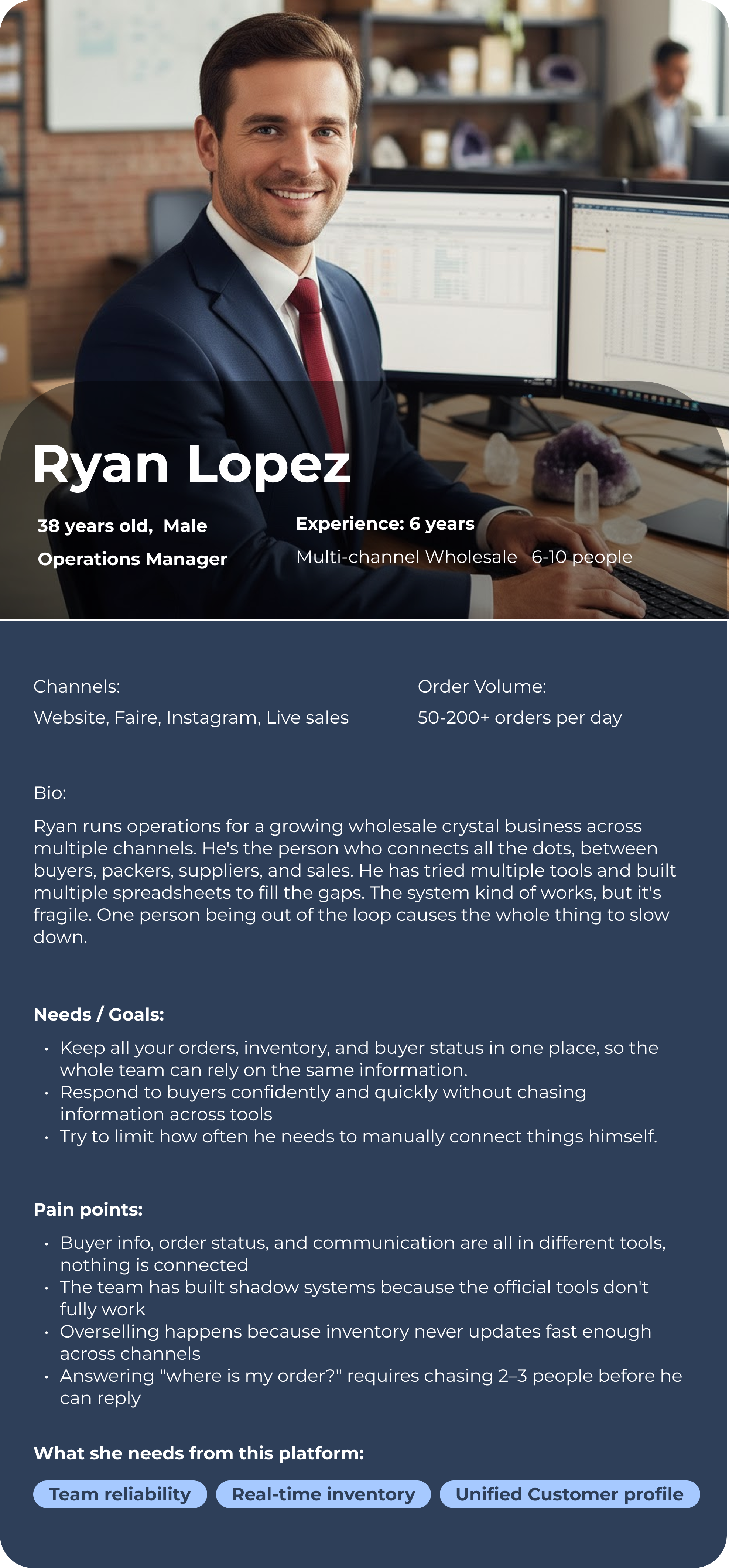
Persona
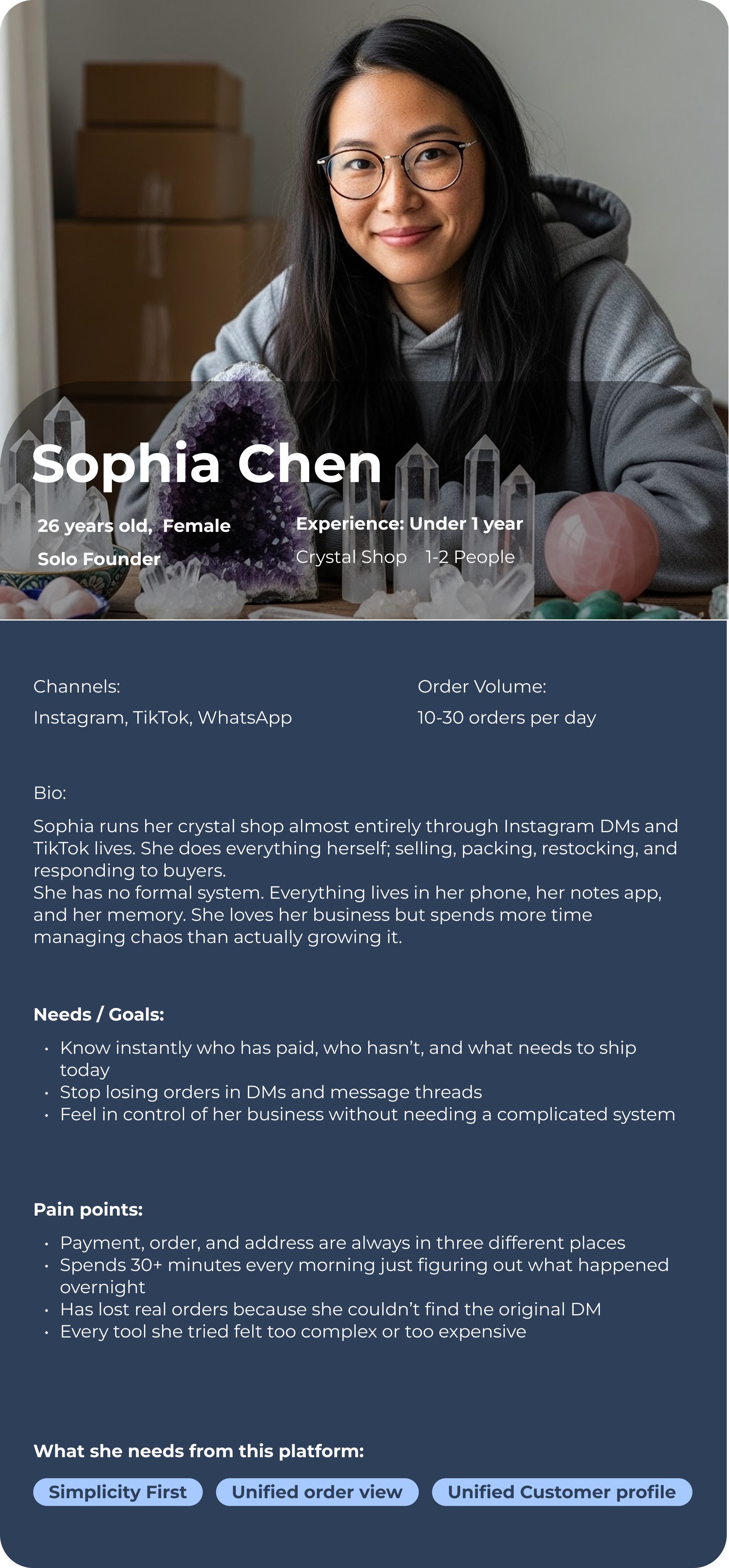
To better guide our design and make informed decision, I created two personas that represent our primaryuser groups. These personas capturing their goals, behaviors, needs, pain points and motivation to keepthe product experience user-centered throughout the project.
Inventory admins handle a wide range of tasks daily, often across multiple tools just to get one thing done.

But the real problem isn’t about these tools lack of features. It’s that admins carry a heavy weight of responsibility while rarely having a clear, complete picture of what’s going on. Most tools make that harder, not easier.
“Admins shouldn't have to piece together their own picture from seven different tabs."
This platform should bring everything into one place.
So the moment they log in, they know what's happening, what needs attention, and what to do next.

The goal of this project is simple:  To help admins regain the time and focus that their tools have gradually taken away.
Designing for Mental Models
We want to design a platform around
three primary mental stages to transform the user experience.

CHAOS
CURRENT STATE
CLARITY
THE CORE BRIDGE
CONTROL
ULTIMATE GOAL
The right information, exactly when it’s needed
visibility problem
Every admin knows the feeling. You open your laptop and you already don't know where to start. Not because you're disorganized, but because the information you need has never lived in one place. You piece it together from different tools, different tabs, different systems. And by the time you have the full picture, half your morning is already gone.
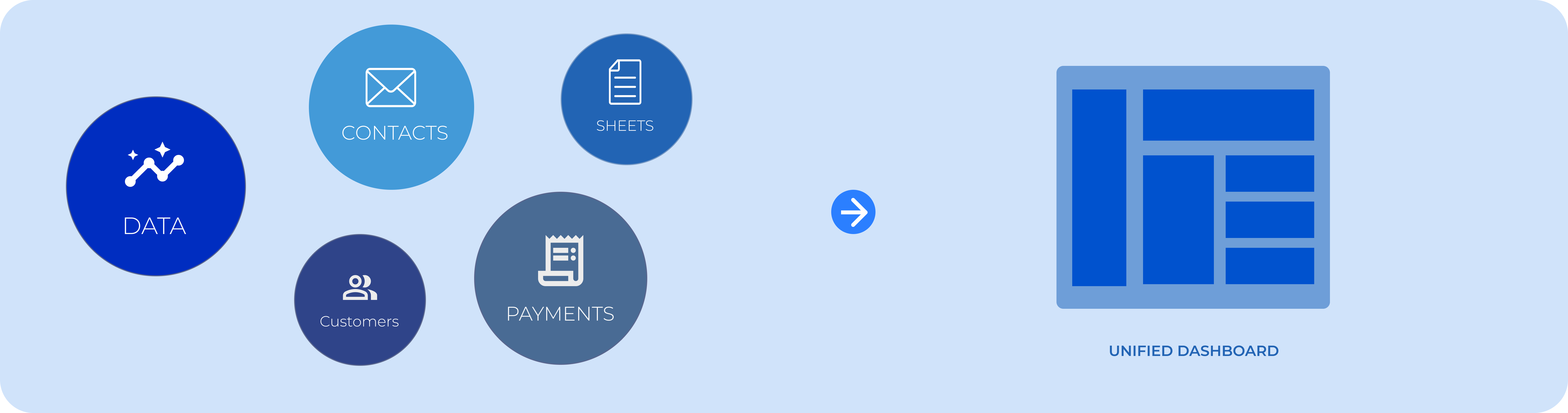
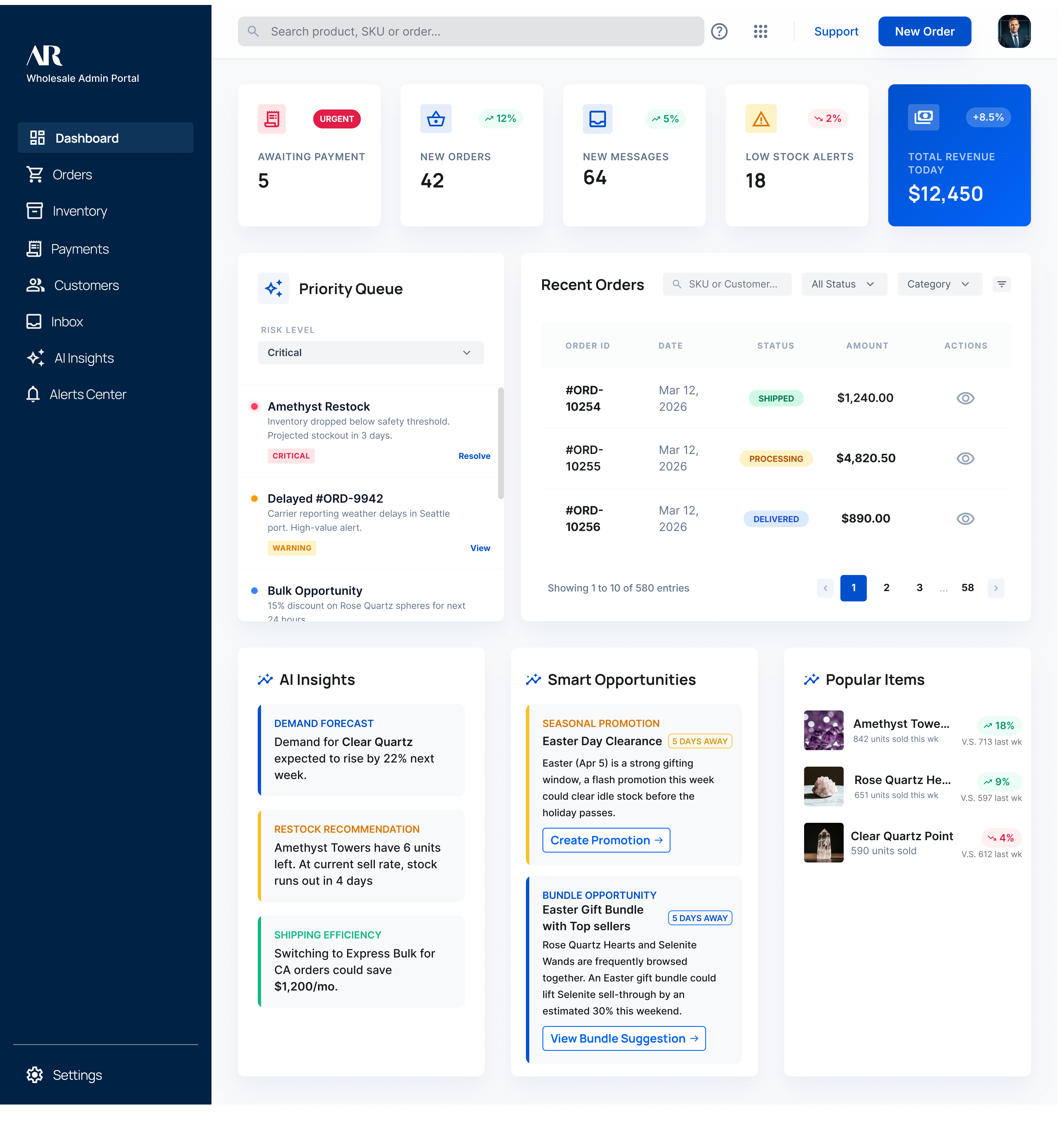
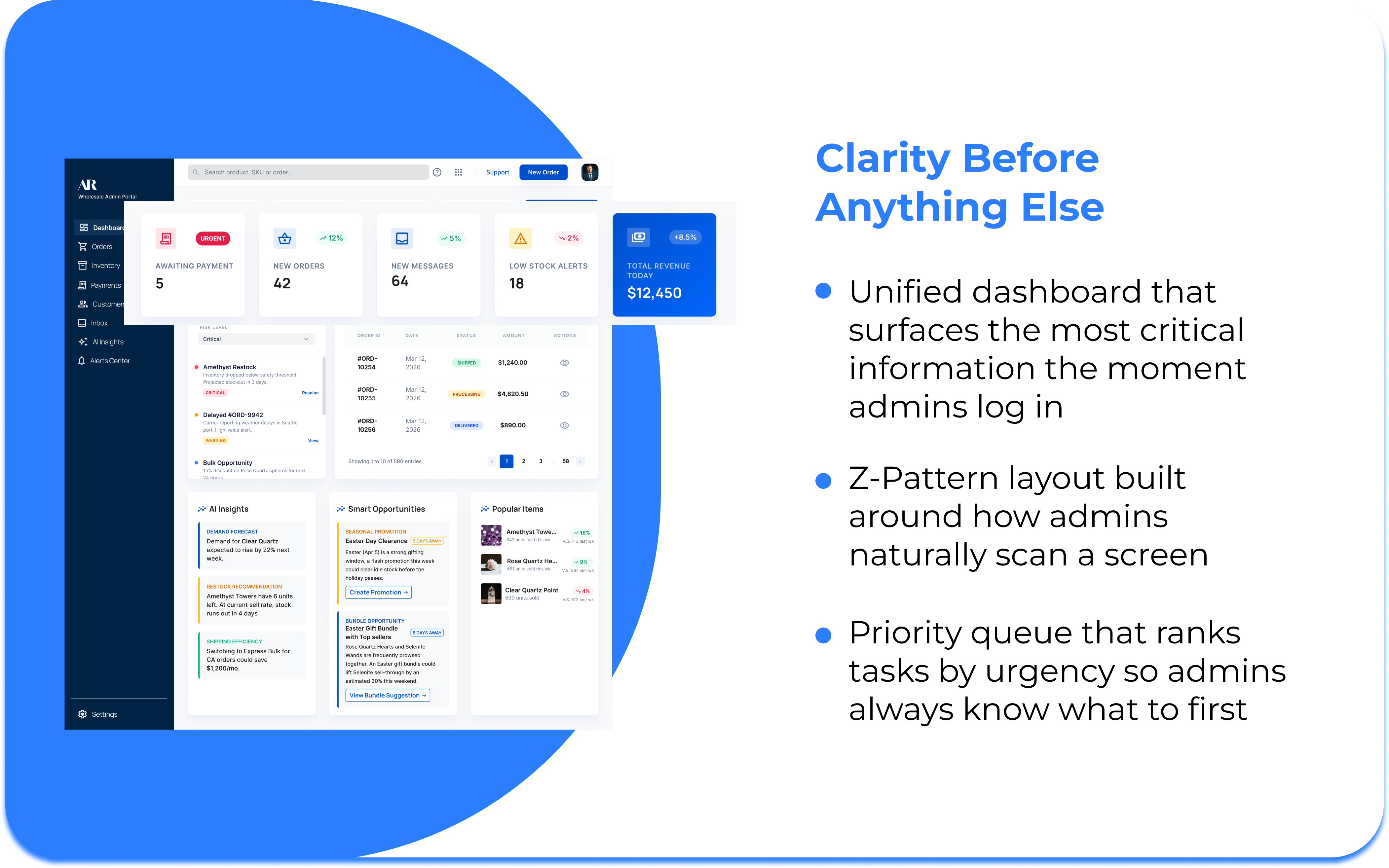
We created a unified dashboard that shows all the important information at a glance.This way, admins will not have to search through different tools and can find everything they need in one place.
1
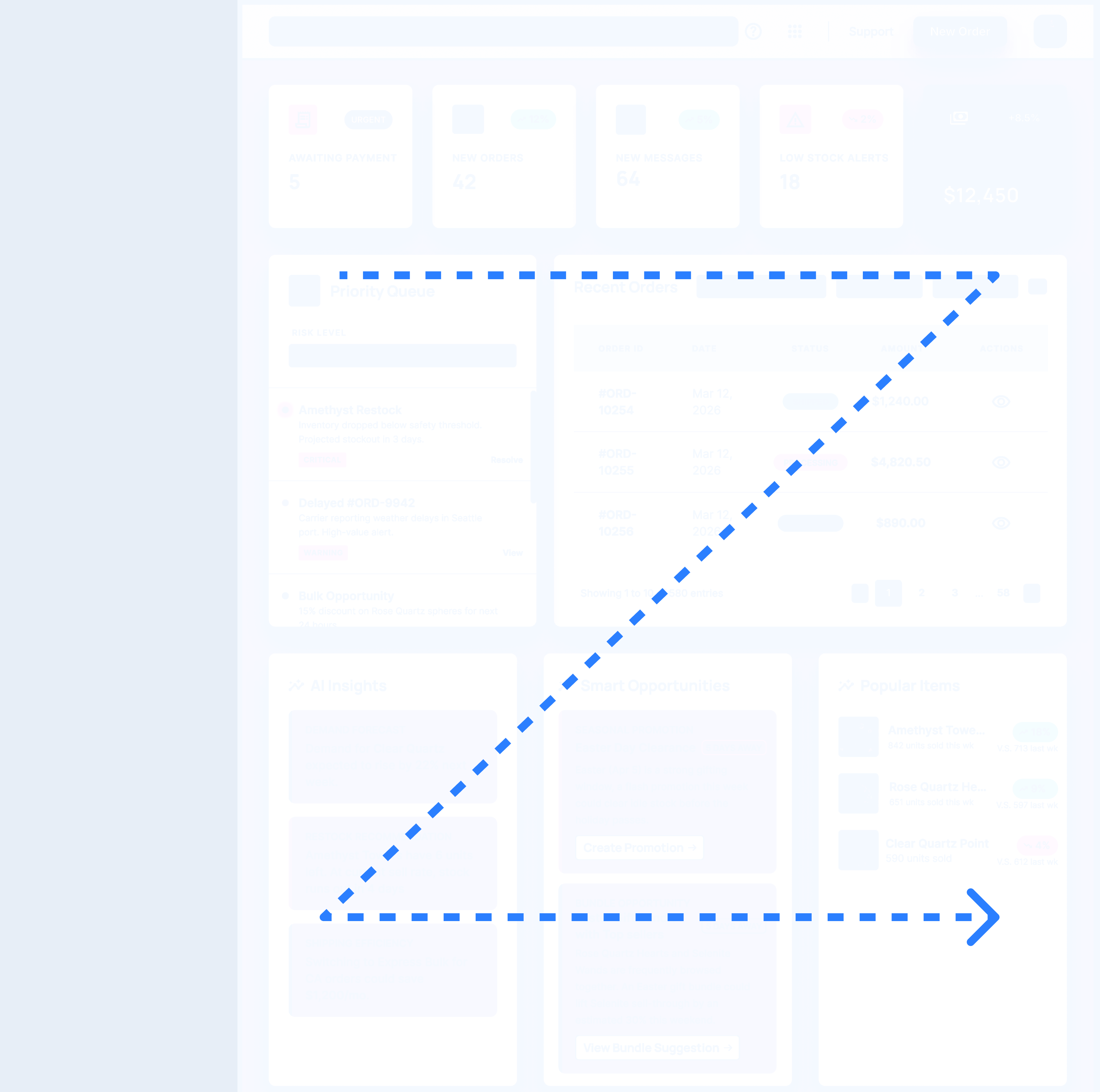
Natural Scanning, Zero Confusion
Users read in a Z-pattern, a natural reading pattern. The dashboard leverages this by placing key information where administrators notice it quickly, ensuring fast orientation. Sections are ordered to guide admins step by step.
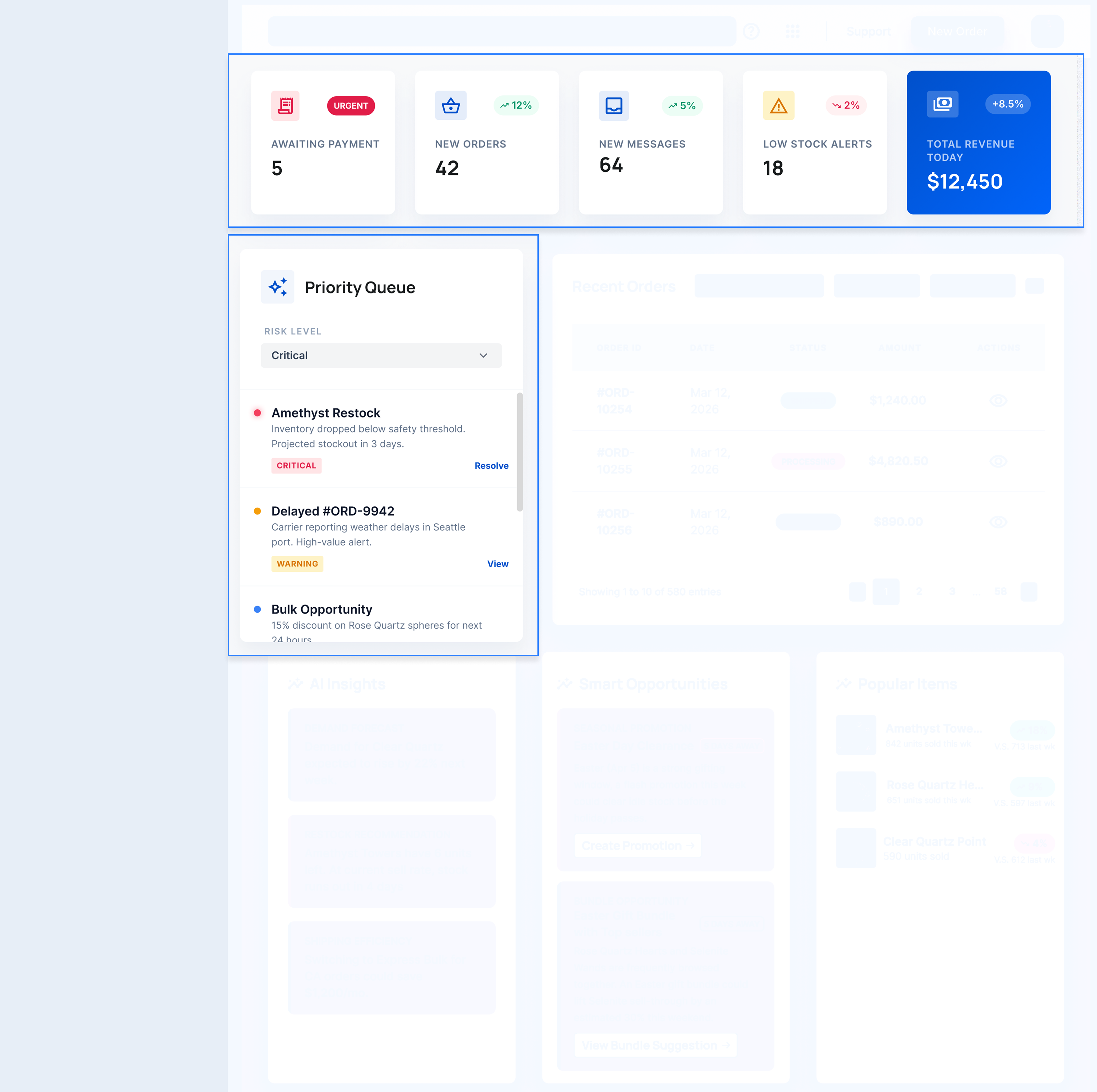
2
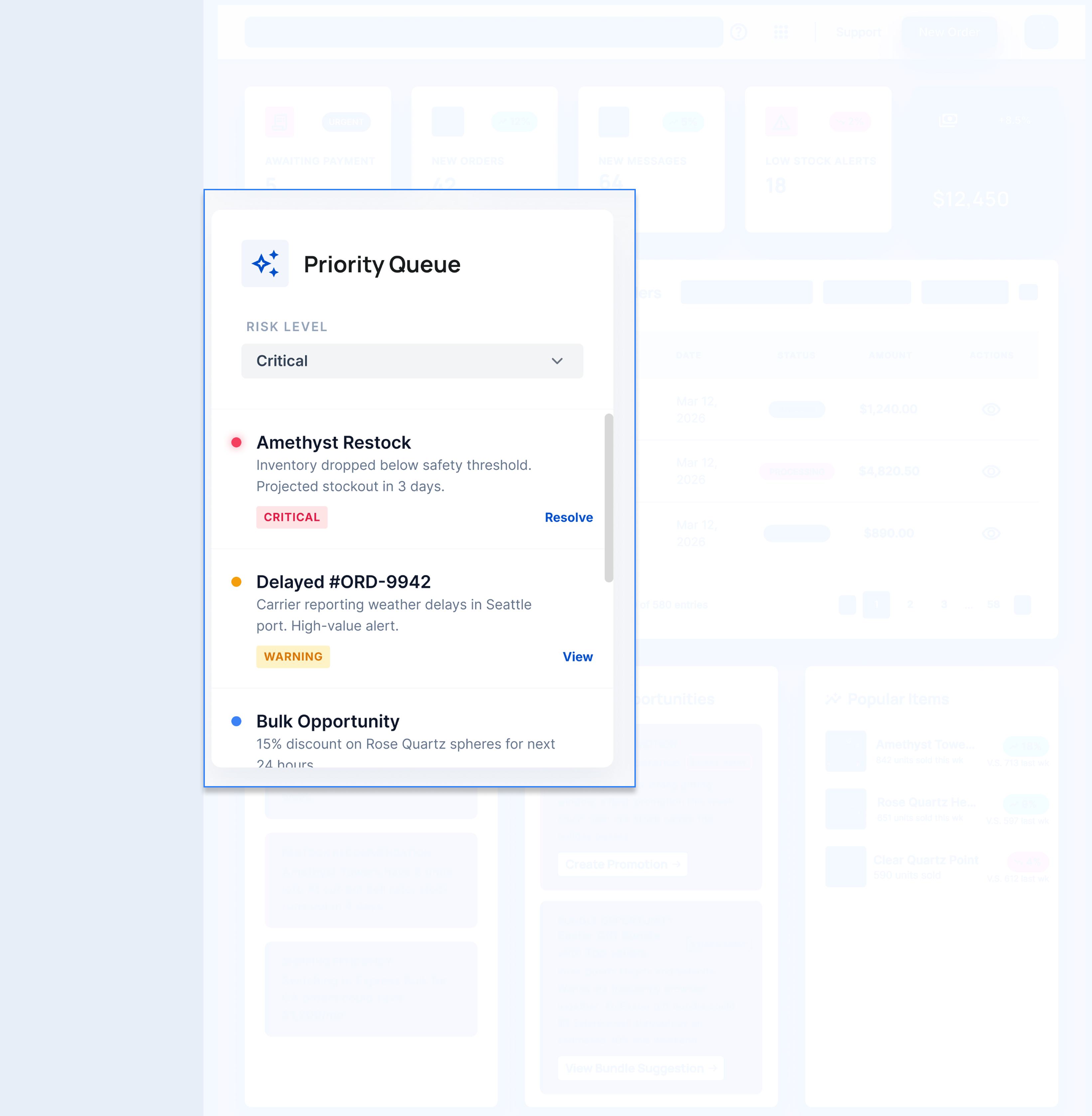
Risk-ranked Priority Queue
The Priority Queue sorts tasks by risk level, so admins can easily see what to handle first without having to sort through everything themselves.
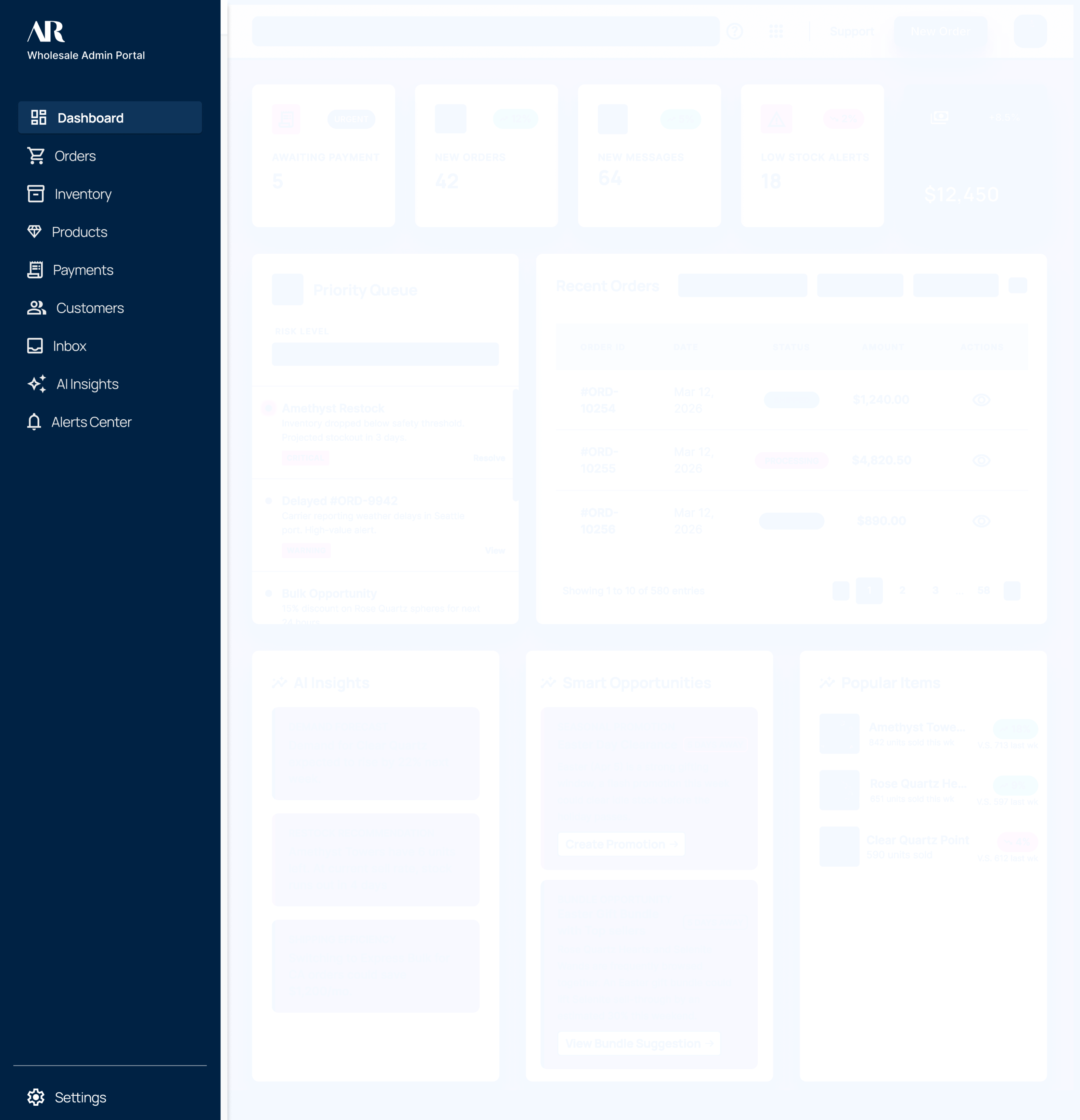
3
Everything in One Place
Everything an admin need will find in this dashboard. It combines orders, inventory, Payments, Customers, Inbox, AI Insights, Alerts Center
Dashboard

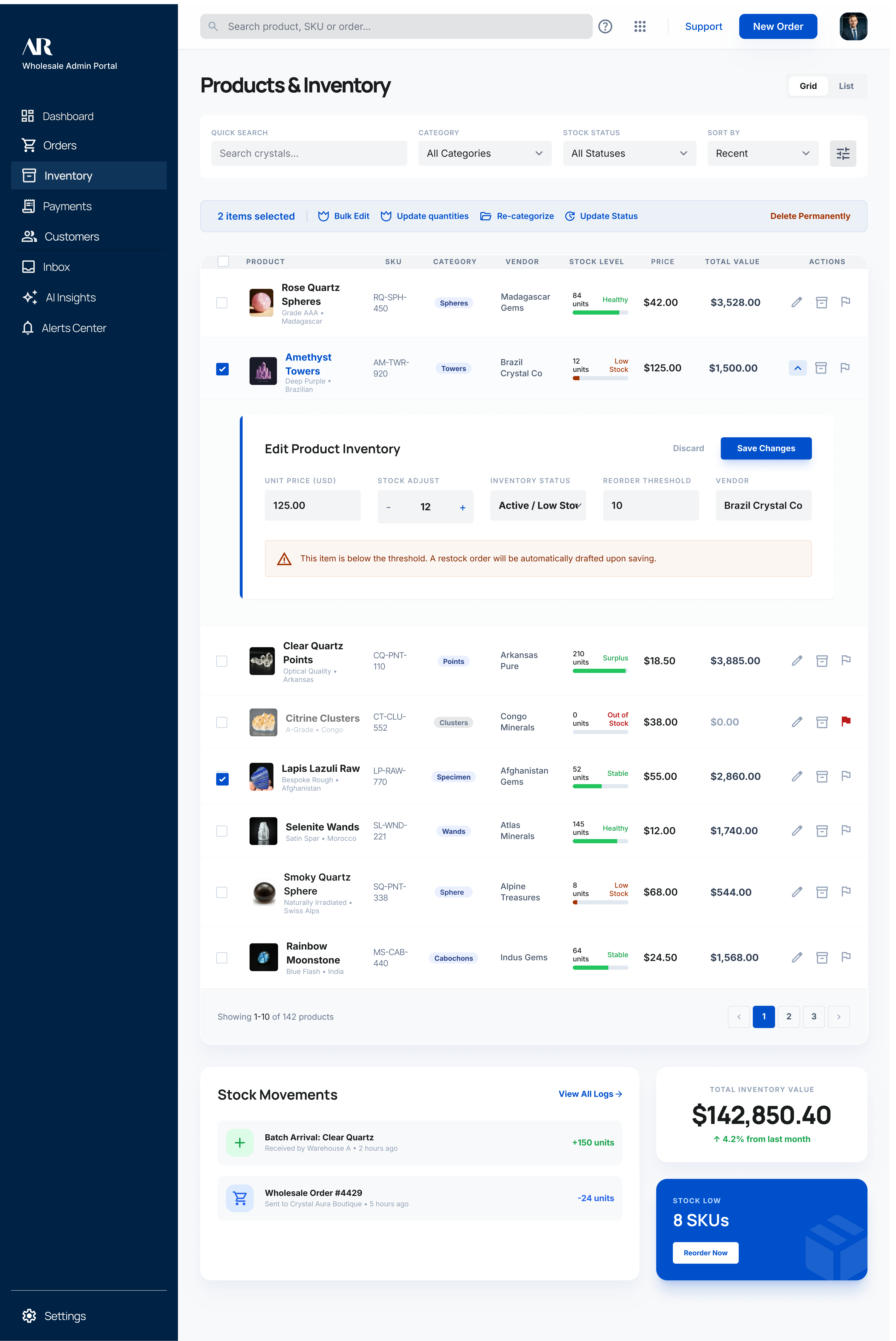
Less Clicks, More Done
Efficiency problem
You're in the middle of your work. You spot something that needs fixing in the inventory list ,a stock level, a status, a pending request.
So you click through to fix it. Navigate back. Find your place again. Repeat, ten times before lunch.

It quietly breaks the focus that good decision-making depends on. You spend the whole day movingbut it never quite feels like progress.
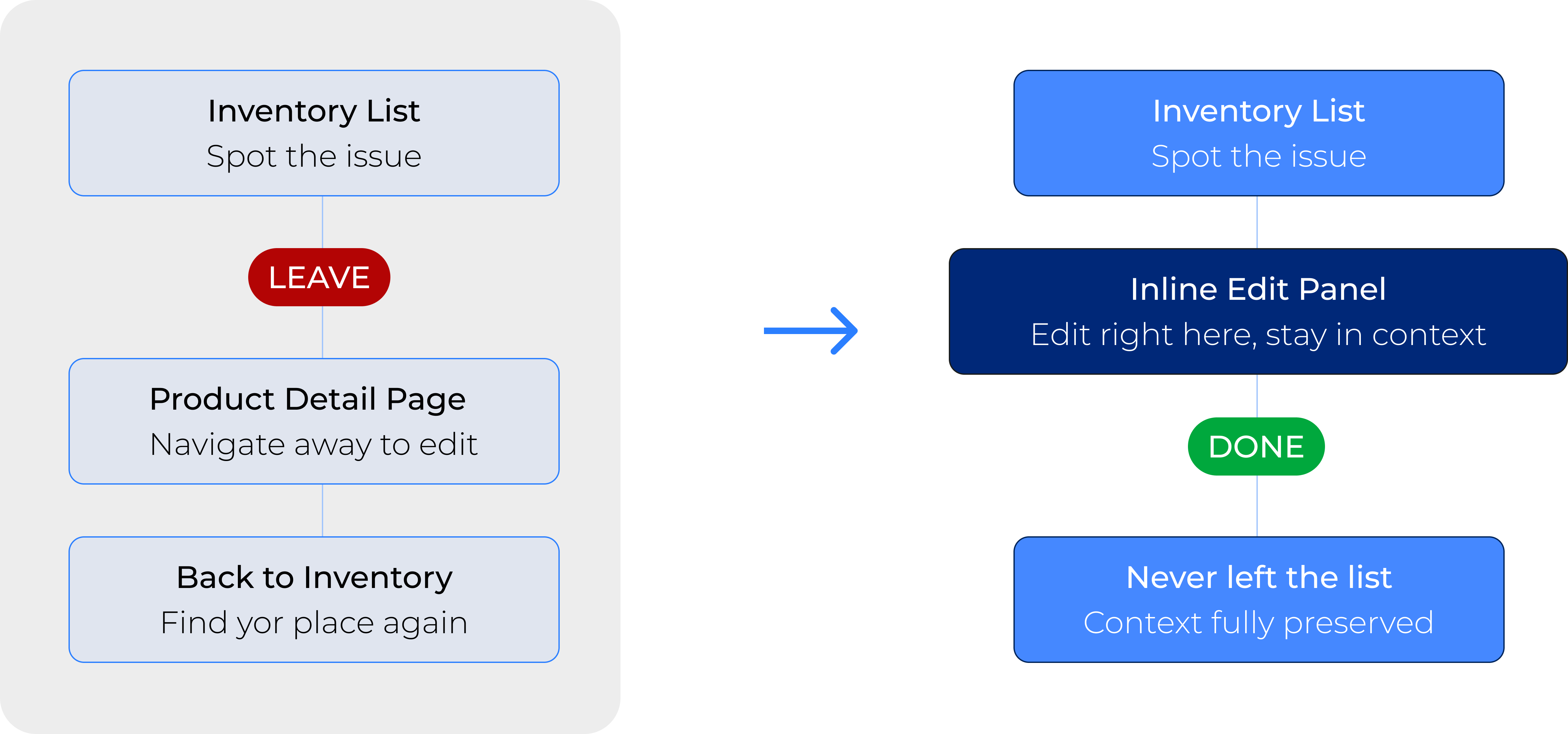
There’s so many steps to click through for one task,
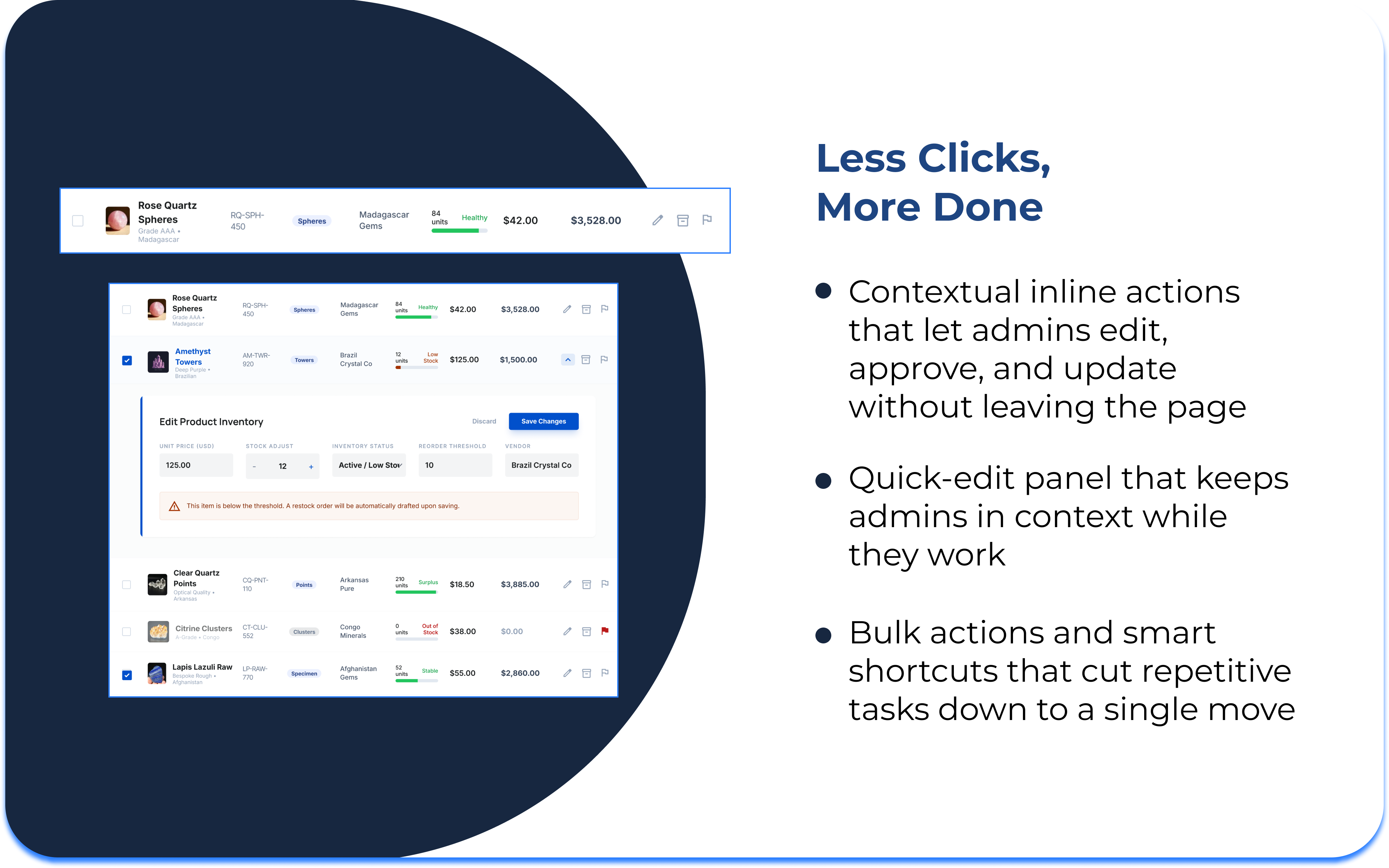
we build any actions you need to take inline, so you never leave the page.
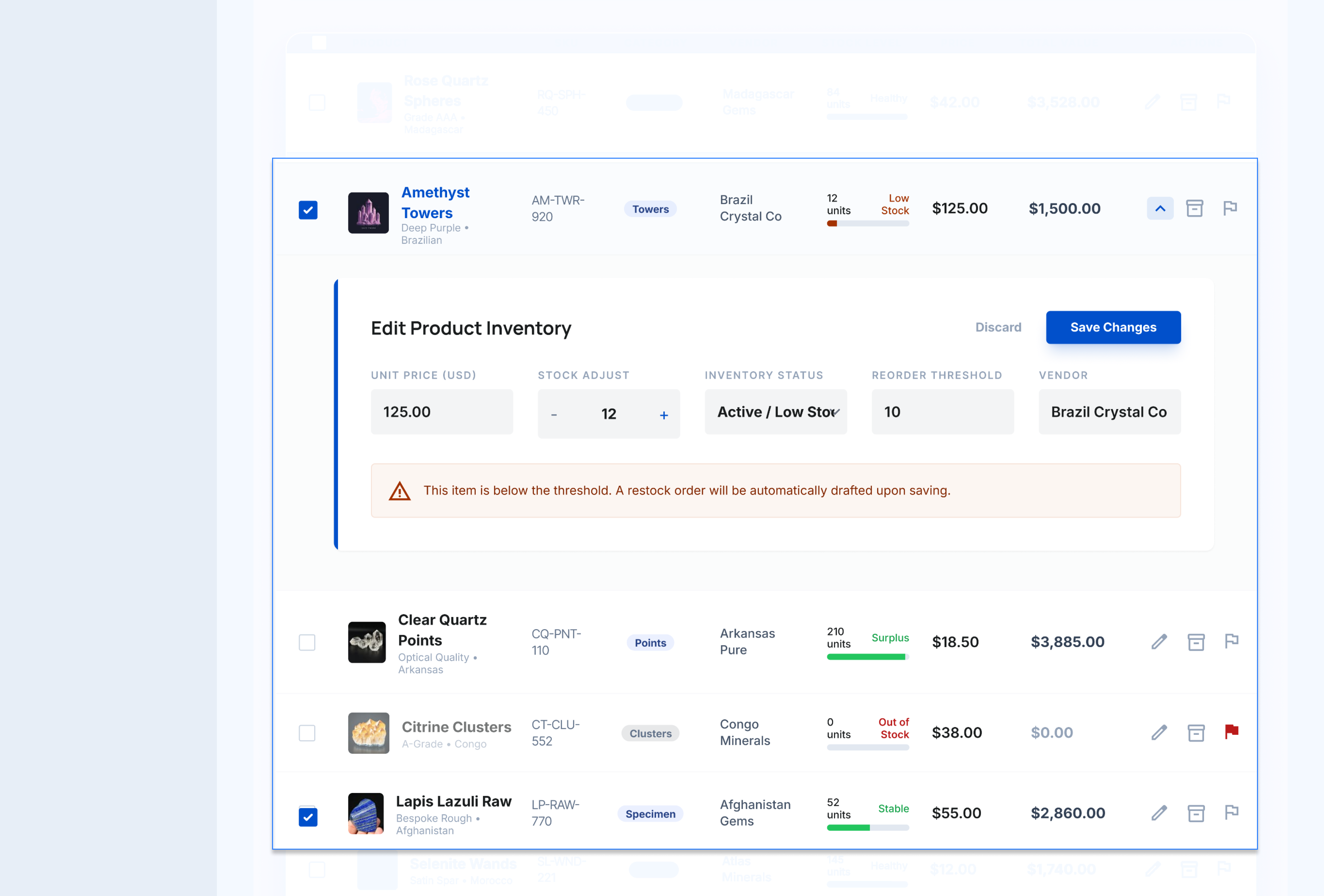
1
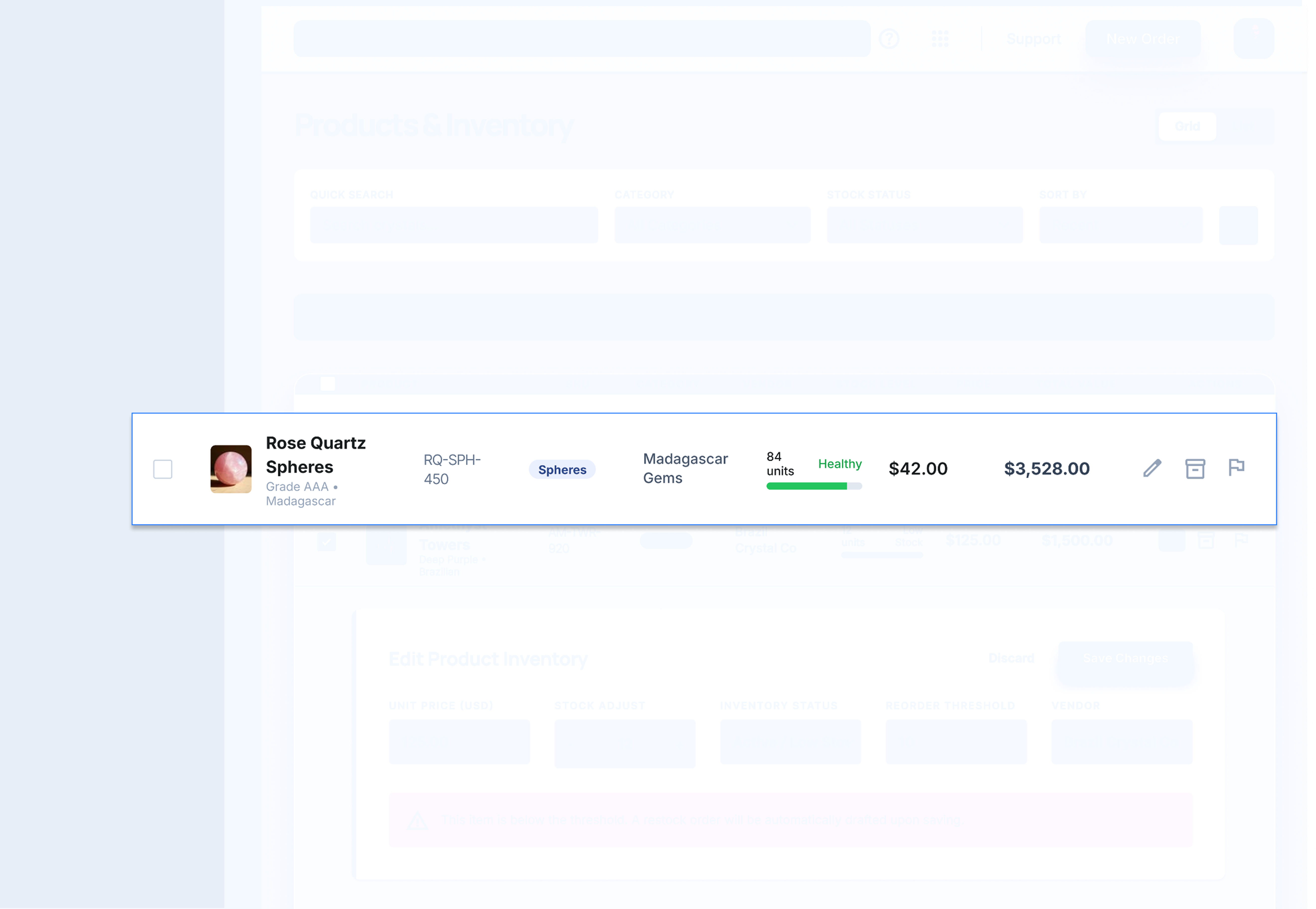
Contextual Inline Actions
Action buttons appear directly on each row. Admins can fix it without leaving the list.
2
Quick Edit Panel
Focused inline panel,

Admins make changes and close it, returning to exactly where they were.
3
Bulk Actions
Select multiple items and apply changes in one move instead of repeating row by row.
Inventory Page
Customer Profile Page

The Platform Thinks With You
cognitive load problem
Admins have to deal with constant mental load every day. They have to keep an eye on stock, watch for risks, and always think ahead. Most platforms only respond when asked. They show what happened before, but don’t help with what to do next.

We highlight what needs attention before the admin even starts looking. It flags risks early, suggests actions, and shows what’s coming up, so admins can focus on decision-making rather than searching for problems.
BUILT WITH AI

AI in this platform isn’t a feature you turn on.

It’s a working partner. It watches, learns, and gets ahead of
problems so admins stay focused on what actually needs their judgment.
Detects operational risk
Surface market signals
predicts stock shortages
recommends next actions
We asked admins what was on their minds when they weren’t actively working. Most of them said the same thing: "What am I missing right now?"

Always having to stay alert is exhausting and never really goes away. We saw that the platform should do more than just help admins complete their tasks.


It should also handle the parts of the job that require ongoing attention, so admins only step in when their judgment really matters. That’s why we added AI monitoring, proactive alerts, and suggested actions.
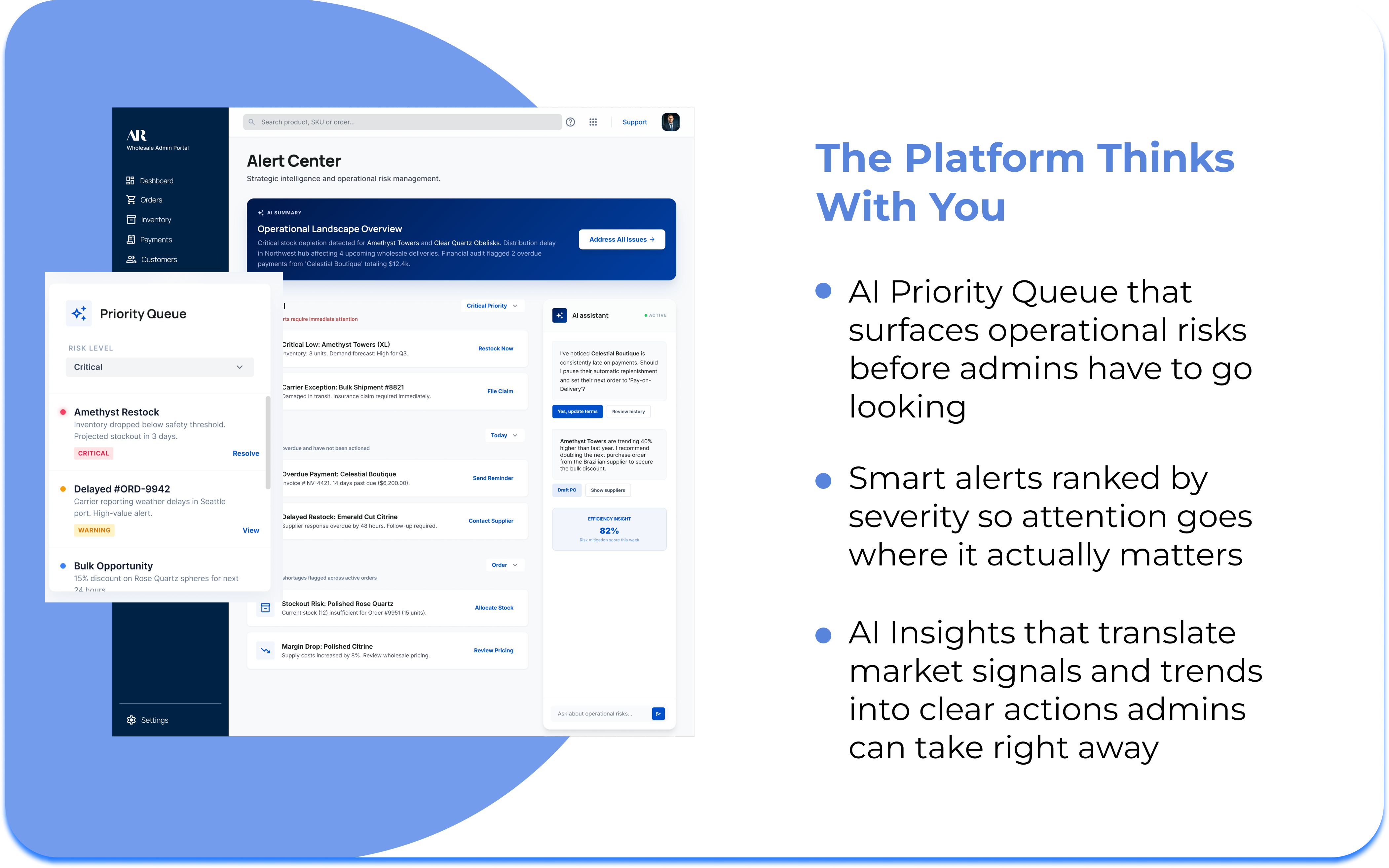
1
Proactive Risk & Opportunity Alerts
The platform monitors order status, stock levels, and payment timelines automatically.One click takes them straight to the Alert Center to act on it.
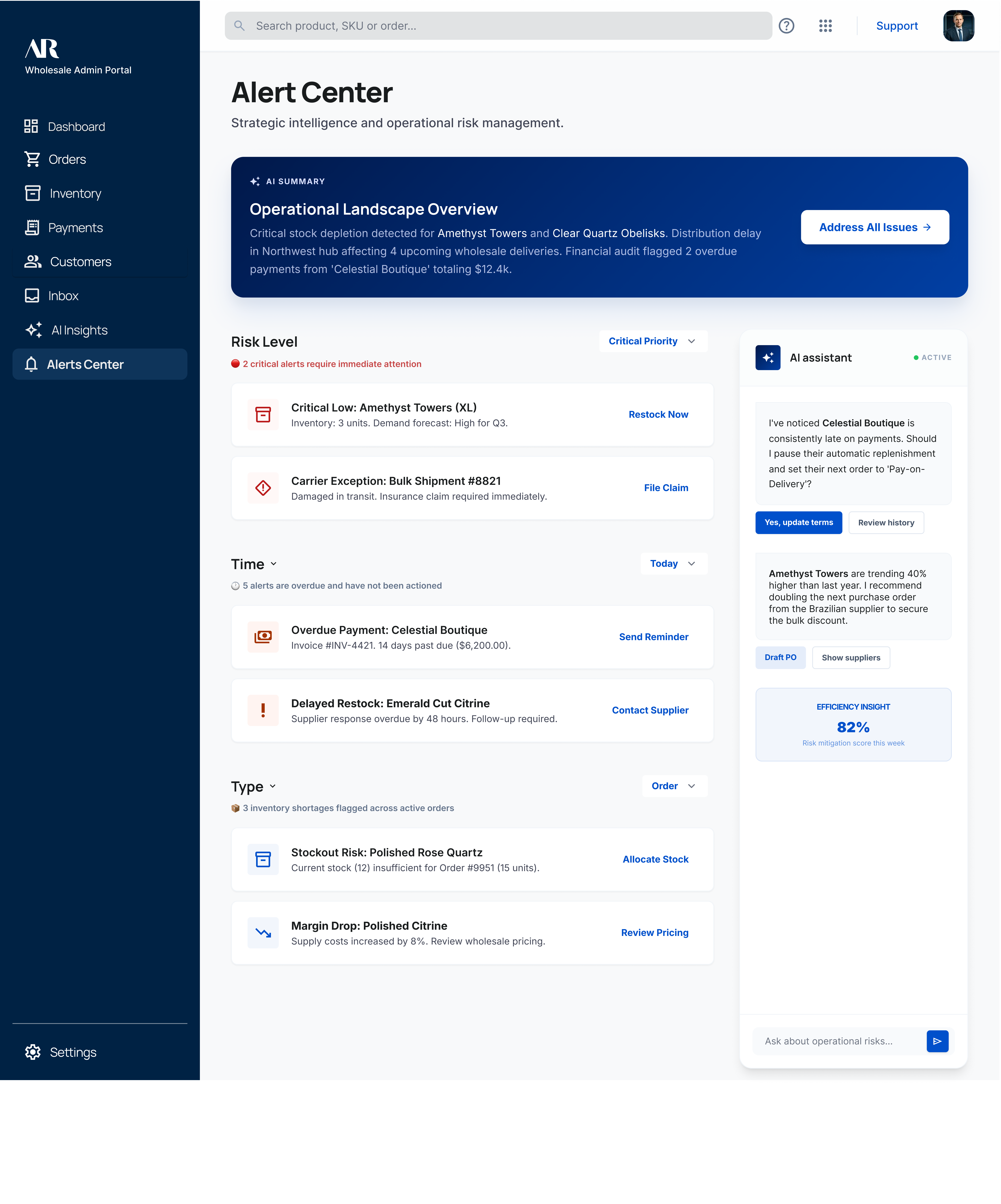
2
Alert Center
The Alert Center monitors the business, highlights risks, and summarizes key points with AI.

Each alert includes a direct action, and a live AI assistant helps admins make decisions without leaving the page.
3
AI Assistant for Recommendation
Admins can ask natural language question, and the AI responds with data and suggested action.

One tap to send a follow-up or flag for review.
4
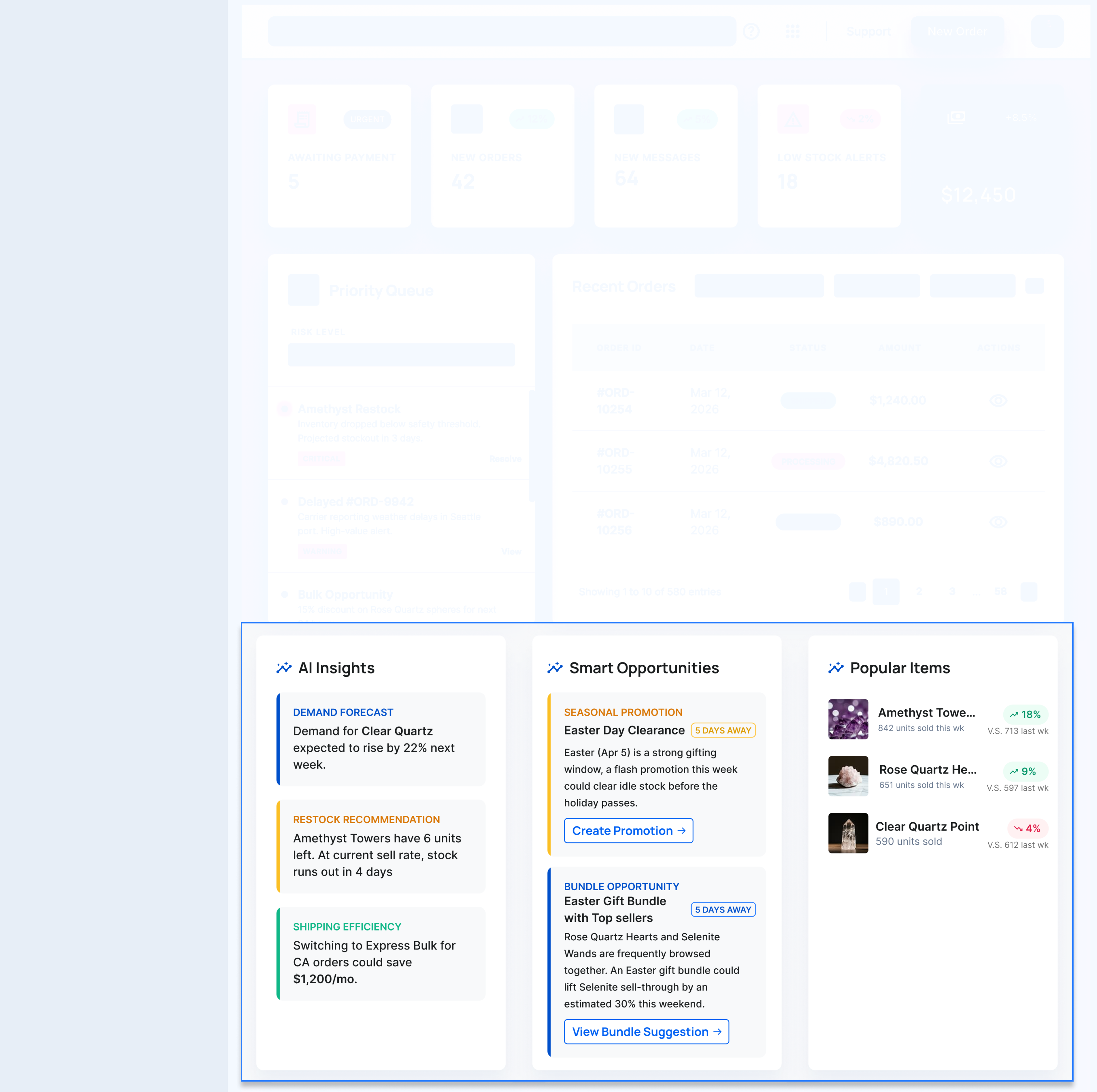
AI Insights on Dashboard
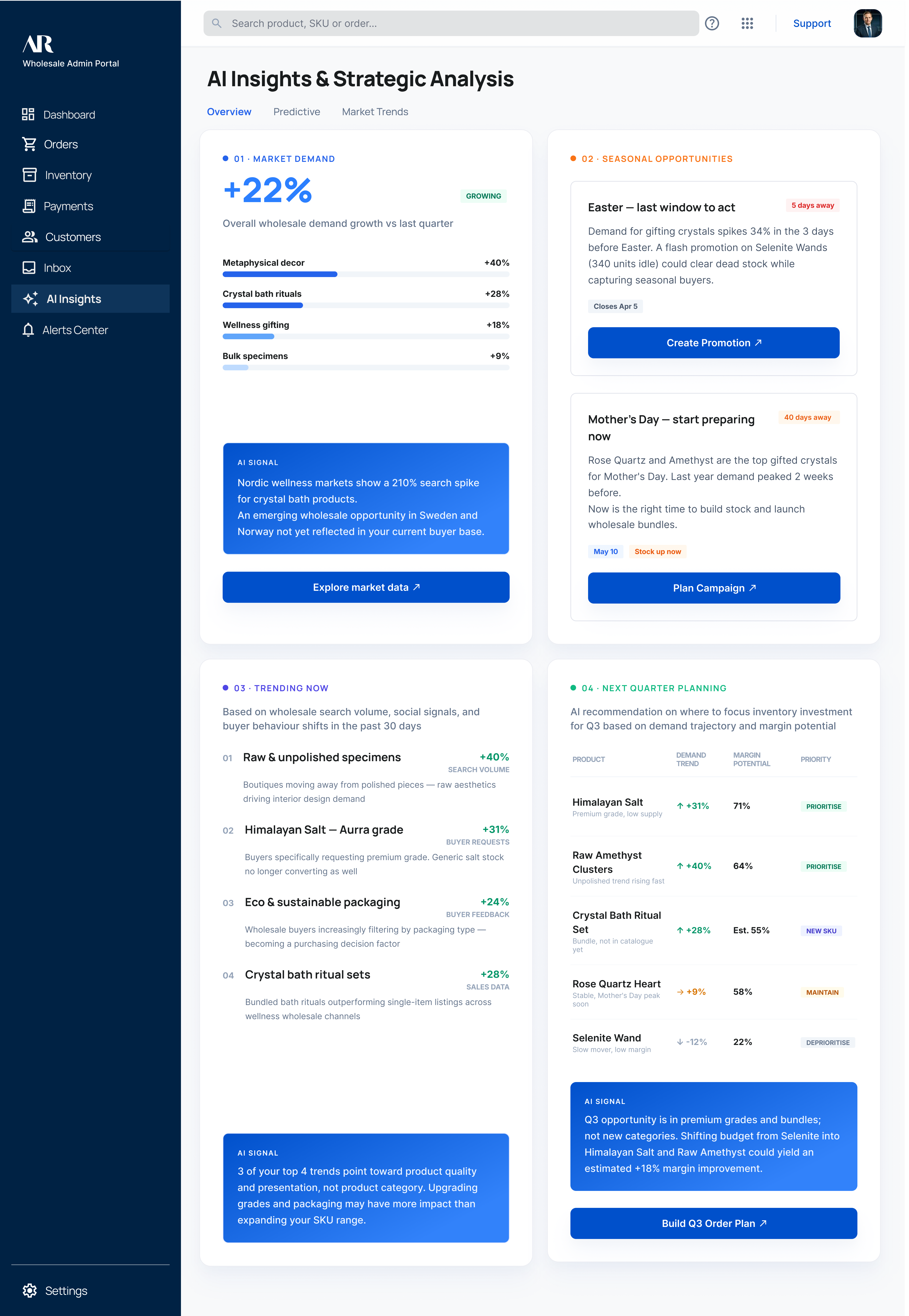
AI Insights & Strategic Analysis translates market signals into clear direction, highlighting trends, opportunities, and risks.

Each section ends with an AI Signal, giving admins a clear next step.
5
Business Intelligence at a Glance
Revenue trends, top buyers, best-performing SKUs, and order velocity are summarized without manual reporting.

Admins see the health of their business from this panel.
AI Insights Page
Alert Center Page
Prototype
This walkthrough shows the full admin journey behind the inventory management experience, from getting a quick overview to reviewing issues, understanding context, and deciding what to do next.

The goal was to create a more proactive workflow that helps admins stay ahead of problems, reduce mental load, and move through complex tasks with greater clarity and confidence.
What I Learned From This Project
Operations tools need to earn trust fast
If the first screen is overwhelming, users will not continue to use it.
Designing for small teams means one person wears many hats.
Features need to serve multiple roles at once.
Integration complexity is a UX problem
Users should never feel the seams between connected platforms.
What Came Next
Currently in exploration
As we worked through this project, we realized that helping users see what needs attention is only part of the solution.

They also need a faster, more natural way to search, ask questions, and move toward action. That insight led us to begin exploring AI Search as a next direction. It’s still evolving, but it has already become a meaningful extension of this work.