B2B Wholesale Inventory Management Platform "Sourcy" AI Search Add-on Feature
Add-on Feature | End-to-End UX Design | UI Design | Design System | UX Strategies | New Feature Development | Content Design | Problem-solving | Iconography | Prototyping
This project is a new feature built on top of the Aurra B2B wholesale inventory management platform. After launching the core platform, we discovered a gap.Admins had the data. They just couldn’t get to it fast enough. This feature replaces multi-step navigation with a single natural language query that returns a structured answer, instantly, in context, with a clear next step.This is how we built it.
Project Goals
Increase the efficiency of admin workflows
Remove the distance between the admin and the answer.
Help admins make confident decisions under pressure, with the right context.
Approach
01.
Understand & Research
02.
Define
03.
Design solution
04.
Validate
MY ROLE
UX Designer | Product Designer | UX Researcher
Timeline
1 Year
Cross-functional collaboration
PM&BA | Engineering
PROBLEM STATEMENT
Wholesale admins handle a lot each day, from orders and inventory to customer contacts, invoices, and fulfillment. But all this information is scattered across different places. Without a single system, they have to juggle several tools, check details by hand, and keep track of everything in their heads. This means the team spends more time managing their tools than running the business, and mistakes often surface only after it’s too late.
DESIGN CHALLENGE
How might we reduce the distance between admin questions and the right answers, so admins can act faster and with more confidence during urgent workflows?
DESIGN SOLUTION
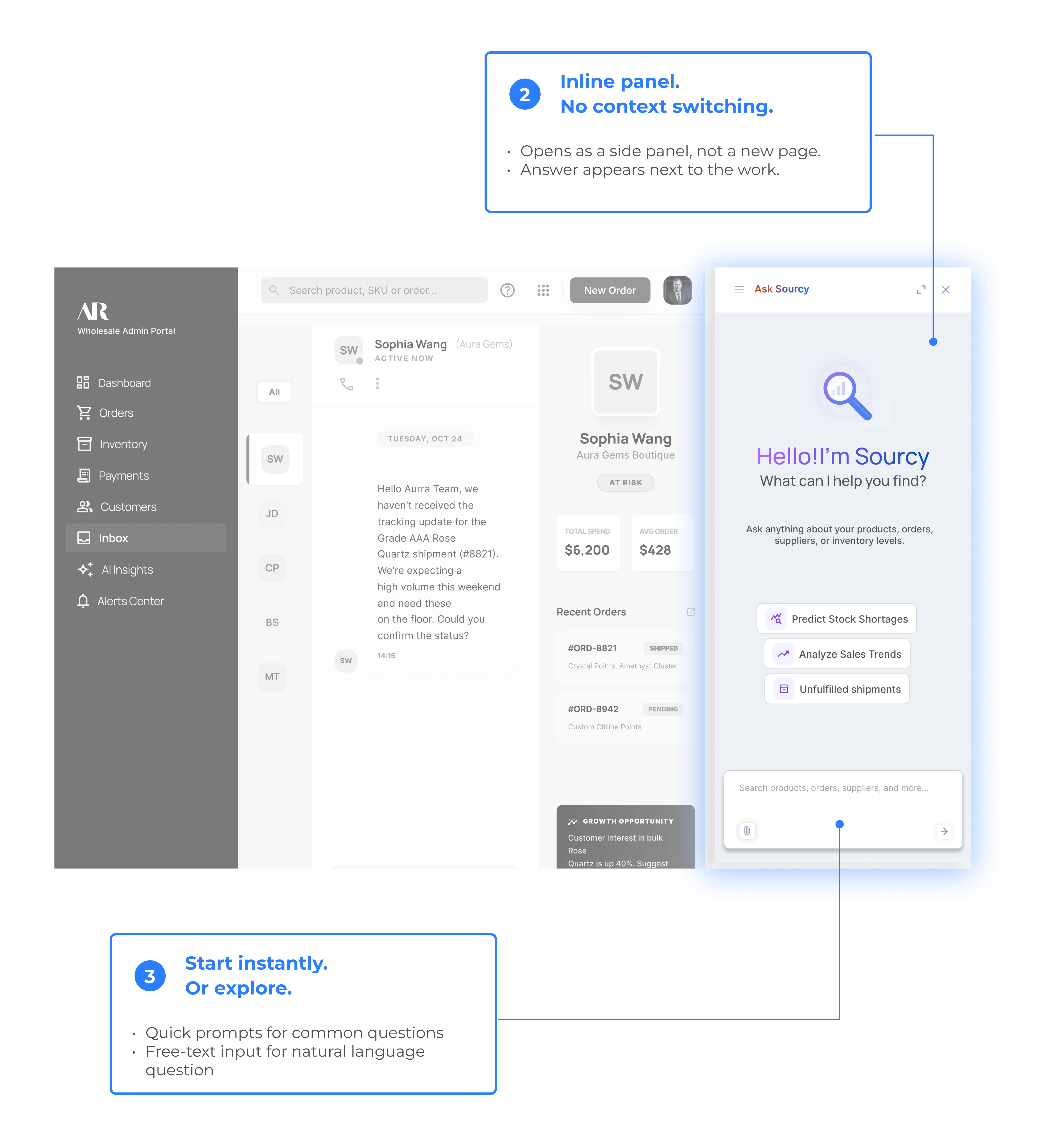
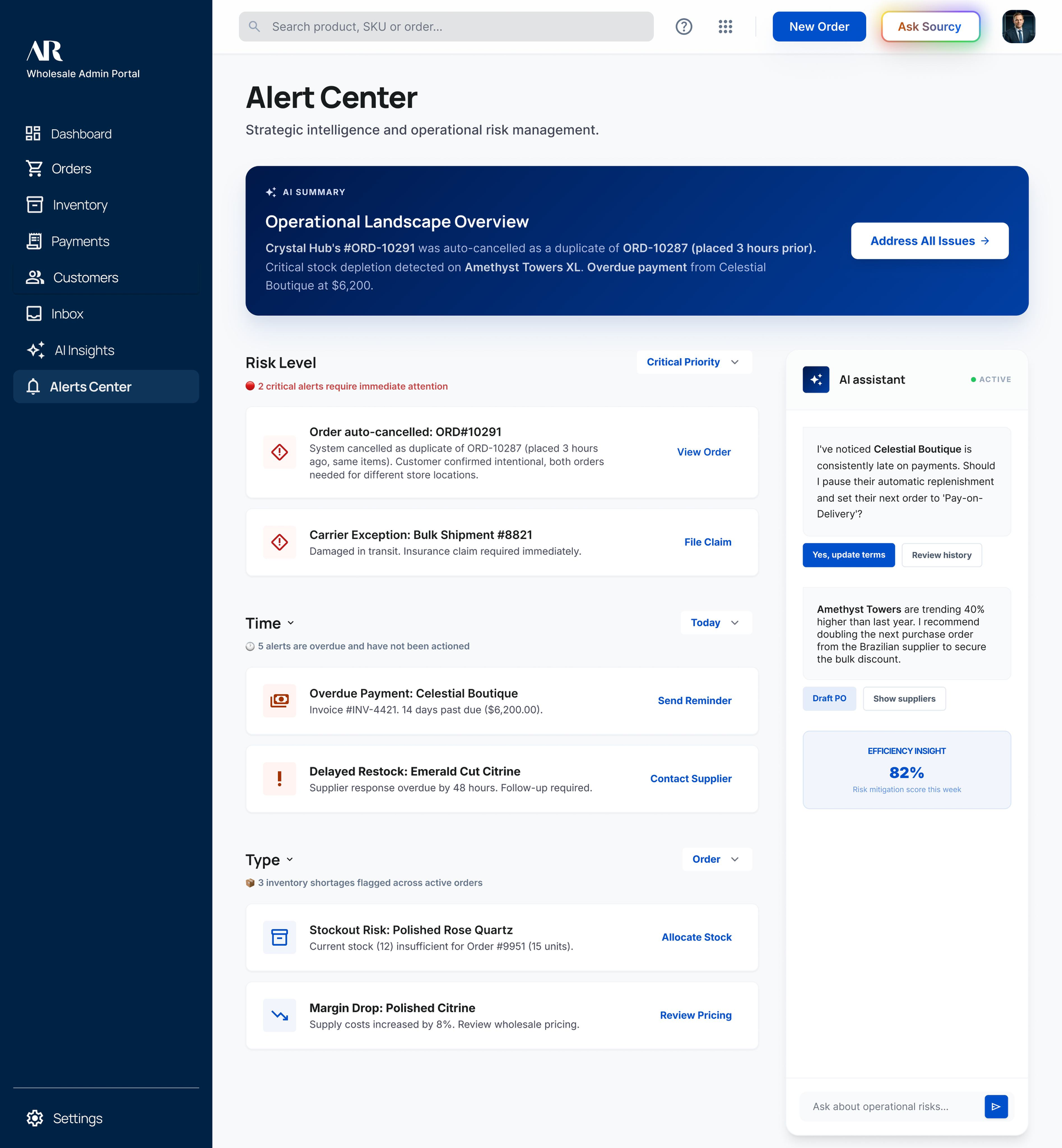
1
One entry point. Always within reach
2
Inline panel. No context switching.
3
Expand to full screen when needed
Information Exisits, but is hard to use
We built the platform to put everything in one place. We solved the pain points for an inventory platform.
When we used it ourselves, something became clear:
Admin could find the information they need, it just takes a lot of time to find.
Especially during busy periods, the extra steps became the problem.
Before forming any hypothesis, we wanted to understand the situation where the platform felt hardest to use.
Three pattens kept surfacing.
Scenario 01
Information Fragmentation
The important data exists somewhere, but it’s buried in the system. So that it’s hard to quickly find what matters.
Scenario 02
Verification Behavior
One question required checking multiple tabs. Admin cannot do a quick lookup.
Scenario 03
Pressure Breaks Decision-Making
When under time pressure, admins guessed, skipped steps and move forward without the full picture
In each scenario, the admin knew what they needed. The data existed. The problem was everything standing between the two.
Three questions shaped our research:
01
Where do admins lost confidence in the system?
Moving from vague frustration to specific, locatable friction points
02
What information do admins need before take actions?
What is the right information at the right moment
03
How does urgency affect decision-making and verification?
Understanding behavior under pressure
Interview & Contextual Inquiry
6 Participant Simulated Session | All Workflow Screens Evaluated
User Group & Session Structure
We placed 6 participants inside 3 working scenarios and observed without intervening. The goal wasn’t to see if they could complete the task, it was to watch where they slowed down, what they searched for, and where they got blocked.
Each participant worked through three realistic situations. The scenarios weren’t edge cases, they were kind of moments admins face everyday.
Scenario 01
Tracking Number Request
Admin needs one answser
System shows everything at once
The Pain Point
Not missing information. Signal buried in noise.
Scenario 02
Problem Investigation
Requires order + shipping + customer + history
Data lives across multiple pages
The Pain Point
Investigation itself adds to the chaos
Scenario 03
End-of-day handover
Admin needs to know what tasks still open for the day
No unified view
The Pain Point
No complete picture
Commion blockers observed across sessions
Too much information at once
Signal buried in dese panels
Manual cross-referencing across pages
No overview of open tasks
Too much information at once
What the scenarios had in common
The system works. The data is there. The problem is the distance between the admin and the answer.
What we found
The real issue wasn't isolated problems It was three missing capabilities: "The platform gave admins data, but left them to do all the synthesis alone."
1
Transparent Evidence
Admins couldn’t tell where information came from or if they could trust it.
The system gave answers, but didn’t show how it got them.
No source. No confidence. No way to verify.
2
Help with decisions
The platform showed problems, but didn’t help solve them.
Admins had to figure everything out on their own
No priority No suggestion no guidance
3
Context-aware search
Every question meant starting from scratch.
The system didn’t connect the dots or remember what the admin was working on.
no context related no reference unaware of others
Key finding
Across all three scenarios, admins knew what they needed to find. The platform just never made it easy to get there
01
The data was always there, the path never was.
No participant failed to understand the task. Every failure was because there’s too many steps, too many pages, too much to hold in mind at once.
02
Information density worked against speed
The more context the platform showed, the harder it was to extract one specific answer; especially under time pressure.
Emotional journey map
We mapped where friction happens And how it impacts stress and confidence throughout the day
Key finding
The emotional arc follows the information, not the work.
01
Unclear information → Rising Stress
Everything looks equally important
Admins must sort and connect information themselves
02
Unclear next step → Confidence drops
Not about hard tasks
It’s about not knowing what to do next
03
Pressure → Risky shortcuts
Guess instead of verify
Skip steps
Move forward without full context
Research Conclusion
Where it breaks
Tasks require cross-referencing
Too many steps to get ONE answer
What they need
Not more data
The right answer
No navigation required
Problem statement
Wholesale admins have the data they need, and the system works. But in urgent situations, getting a complete view of customers, orders, payments, and inventory takes too many steps across too many pages. When time is tight, these extra steps slow things down. Admins must search, click, and piece together information themselves, often missing crucial context when it matters most.
Reseach gave us a clear brief:
Admins don't need more tools or more data. They need answers, Instantly.
Our Goal:
Remove the distance between question and answer.
what the research demanded
Each finding from our research pointed directly at a design requirement.
FINDING 01
Too much information = hard to find answers
→
Synthesize, don’t just surface.
Give fewer, better answers. Already assembled answers.
FINDING 02
No clear priority under pressure
→
Guide, don’t just inform.
Show what to do next, and why.
FINDING 03
Answers require multiple lookups
→
Answer at the point of the question.
Bring the answer to the admin.
FINDING 04
Pressure leads to mistakes
→
Zero friction, zero configuration.
The system should just work.
DESIGN PRINCIPLES THAT FOLLOWED
The research directs four principles that shaped every design decision.
Human in the loop, Always
AI suggests, admin decides
No automatic actions
Decision support, not automation
Help thinking
Don’t replace judgement
Low friction entry
Start with one simple action
Expand only when needed
Right answer, Right format
Short, clear, actionable
Designed for time pressure
WHY AI SEARCH
With the principles defined, the solution became clear. AI search wasn’t a trend we followed, it was the only approach that satisfied every requirement the research had set.
Admins ask the question. The system returns the answer.
CORE EXPERIENCE
The experience is built around a single idea:
Answer the question, instantly, in context, and with clear next steps.
01
Ask
Admin types a question in natural language
→
02
Understand
AI interprets intent and gathers relevant context
→
03
Answer
Summary · Key data Explanation · Recommended action
→
04
Act
Admin takes action directly from the answer
KEY FLOW
Shared pattern for all AI search flows
Admin opens AI search
.
Enters a natural-language query
.
AI interprets intent
.
Identifies if the admin is asking about inventory, operations, risk or a buyer question
.
AI returns a structured answer
Short summary
Key records
Explanation
Recommended next actions
.
Did AI give the correct answer?
NO
Rate the AI response
Re-generate response
YES
Admin takes action
Opens a record
Edits inline
Reserves stock
Follow up with buyer
Flags risk
WHAT THE SYSTEM RETURNS
Instead of raw data, the system returns a structured answer:
.
Summary
A clear, one-line answer
.
Key Data
Relevant records across systems
.
Explanation
Why this is happening
.
Recommended Actions
What to do next, immediately
DESIGN ITERATIONS
The final solution didn’t arrive fully formed. Before landing on the final design solution, we explored multiple directions, testing different entry points, answer formats, and interaction patterns. Each round of iteration brought us closer to the core principle: the fastest path between question and answer, with zero friction.
A customer is waiting. Admin needs one specific answer, FAST
Before
Scanned the full panel to find one piece of information
FLOW DIAGRAM
Admin received message from a customer
Customer asks for tracking number
Admin opens inbox
Admin types query “Sophia Wang tracking”
AI searches orders and shipping data
AI summary returned with tracking number and order context
Next step suggested: Reply with tracking details
Admin reviews answer
Reply to customer
.
.
SCENARIO 02
Issue Investigation
Problem
Something went wrong. Admin needs full context to solve the issue.
Before
Manual check across different pages. Each lookup added time and pressure.
FLOW DIAGRAM
Shipment delayed alert triggered
Action needed from Admin
Admin needs full context (order, carrier, customer history)
Admin types query “delayed order”
AI cross-searches
Incident summary with full context assembled
Next step suggested
Admin reviews answer
Admin responds to customer about the update
.
.
SCENARIO 03
End of day handover
Problem
Shift is ending. Admin needs to know what’s still open, without opening every page.
Before
Scanned for unresolved items every page, easy to miss something.
FLOW DIAGRAM
End of day
Admin needs summary of payments, orders, messages
Admin types query “what’s still open today”
AI scans all pages
AI gives an unresolved list
AI prioritizes open items
Next step suggested
Admin responds to the prioritized open items
.
.
04
REFLECTION & IMPACT
WHAT SHIFTED
The biggest reframe in this project wasn't a design decision, it was a research one.
We started expecting to find missing features or broken flows. What we found instead was a synthesis problem. The data existed. The system worked. Admins were just left to do all the connecting themselves.
That reframe changed everything. The solution wasn't adding more, it was removing distance.
WHAT WE’RE WATCHING
The project is in early stages, so impact is still being validated.
The questions we’re tracking:
Do admins act faster, not just find faster?
Does the feedback look build trust over time?
Where does the AI still fall short under real pressure?
AI WAS A CONCLUSION, NOT A TREND
AI search wasn’t a trend we followed. It was a conclusion we reached.
Every research finding pointed to the same gap, admins needed answers, not navigation. Natural language search was simply the most direct way to close that distance.
Let's keep in touch
If you like what you see and want to work together, let's connect!